Scenario - Unit Test Creation
This scenario was developed to demonstrate how to create a unit testing framework for a component within NOS3.
This scenario was last updated on 06/10/2025 and leveraged the dev branch at the time [b87b2f92].
Learning Goals
By the end of this scenario you should be able to:
Create unit tests to check the functionality of NOS3 satellite components and their commands.
Create unit tests for a brand new component or add to an existing test suite.
Reach full coverage for all relevant files within a component.
Prerequisites
Before running the scenario, complete the following steps:
Note that the make code-coverage command can only be run if NOS3 is cloned directly into the Linux environment.
The command will not work if using shared folders from your host into VirtualBox (install option A).
Walkthrough
File Structure Exploration
With a terminal navigated to the top level of your NOS3 repository:
cd /nos3/components/sample/fsw/cfs/unit-testIf there is no unit-test directory within the cfs directory of your component, either copy one from sample or generate one with the sample script.
Ensure that the unit-test folder where you are working is within the fsw/cfs/ directory.
Once you are in the unit-test folder:
Run the command
ls.You should see
CMakeLists.txt coveragetest/ inc/ stubs/as the output. If any files are missing, copy them from the sample component or use the sample script to generate them.Open the
CMakeLists.txtfile.Check that the name matches the component you are working with. If not change them to match. Then close the file.
Navigate to the
coveragetest/and runlsagain. You should seecoveragetest_sample_app.c sample_app_coveragetest_common.has the two files within this directory. Thecoveragetest_sample_app.cis where you will be writing the unit tests.cd ..out ofcoveragetest, runcd inc, and openut_sample_app.h. Then ensure that the filenames being included here match the component you intend to work on.Finally
cd ..,cd stubs, andls. You should seelibuart_stubs.c sample_device_stubs.c.Again, check both files to make sure the component name matches the one with which you are working.
cd ..andcd coveragetest/open
coveragetest_sample_app.c
Writing Unit Tests
Look inside the coveragetest_sample_app.c file. This file is where you will write your actual unit tests.
Within the coveragetest file you will see an array of existing functions such as
Test_SAMPLE_AppMain,Test_SAMPLE_AppInit,Test_SAMPLE_ProcessCommandPacket,Test_SAMPLE_ReportHousekeeping, etc.These functions are split up this way to interact directly with similarly named functions in the
sample/fsw/cfs/src/sample_device.cfile.
Example of NOOP Test
The following is a specific example of a test, found within the Test_SAMPLE_ProcessGroundCommand function:
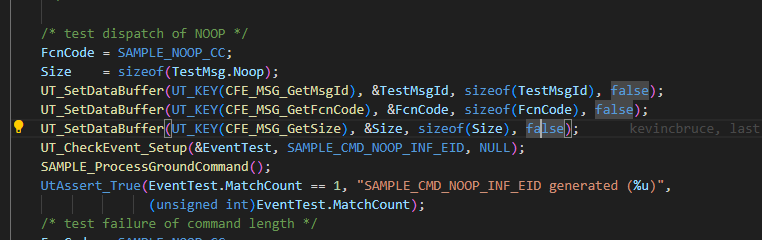
The FcnCode is the command code. It is a key part of understanding the mechanics of NOS3. It is how the flight system is able to know which command is being sent and - in this case - specifies which command is being tested.
The
Size = sizeof(TestMsg.Noop)is how the length of the command is set. The key thing here is that commands without accompanying arguments all share one size. Commmands that have arguments associated with them, in this case config, need to have a different size specified in the union struct at the top of the function.The
UT_SetDataBuffer(UT_KEY(CFE_MSG_GetMsgId), &TestMsgId, sizeof(TestMsgId), false);UT_SetDataBuffer(UT_KEY(CFE_MSG_GetFcnCode), &FcnCode, sizeof(FcnCode), false);UT_SetDataBuffer(UT_KEY(CFE_MSG_GetSize), &Size, sizeof(Size), false);lines specify the command string to be sent to cfs and is how the command is sent to thesample_device.c fileSAMPLE_ProcessGroundCommand();Runs the commandUtAssert_True(EventTest.MatchCount == 1, "SAMPLE_CMD_NOOP_INF_EID generated (``%u)",checks the results(unsigned int)EventTest.MatchCount);
Building/Running the tests and generating a coverage report
Note that the make code-coverage command can only be run if NOS3 is cloned directly into the Linux environment.
The command will not work if using shared folders from your host into VirtualBox (install option A).
make cleanmake configmake debugmake code-coverage -jexitfirefox docs/coverage/coverage_report.html
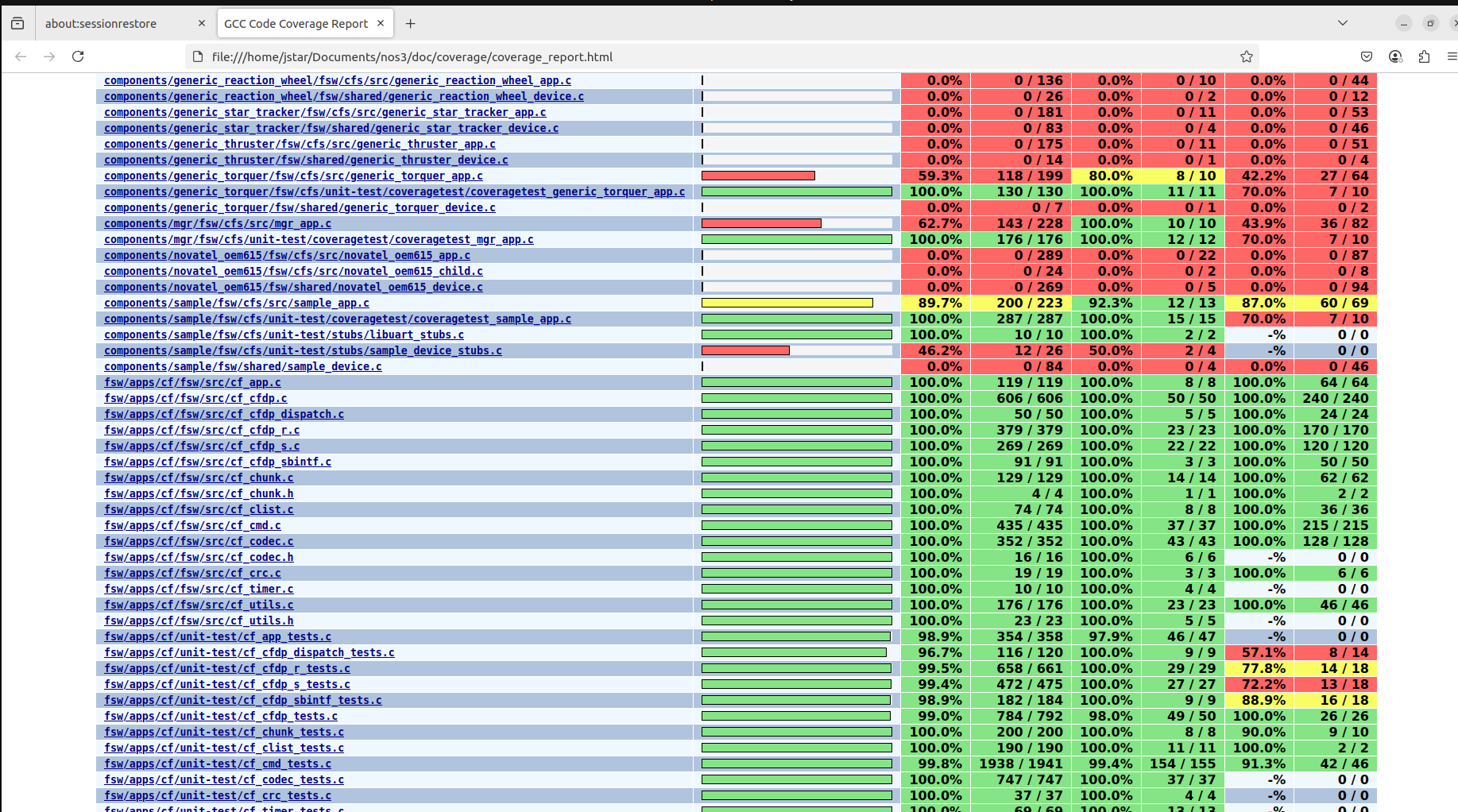
The coverage_report.html file will display the code coverage and tests result for every file in the directory.
The resulting file should look like this when opened: