Scenario - Constellation with Lunar Focus

This scenario was developed to demonstrate running NOS3 in a configuration which has multiple spacecraft in a constellation. For this scenario, these spacecraft are in an orbit about the Earth-Moon L2 point.

This scenario was last updated on 12/10/2025 and leveraged the 802-constellation-scenario-with-lunar-focus branch at the time [c415ff7].

Learning Goals

By the end of this scenario you should be able to:

  • Command multiple spacecraft from a single ground station

  • Receive telemetry from multiple spacecraft in a single ground station

Prerequisites

Before running the scenario, complete the following steps:

Walkthrough

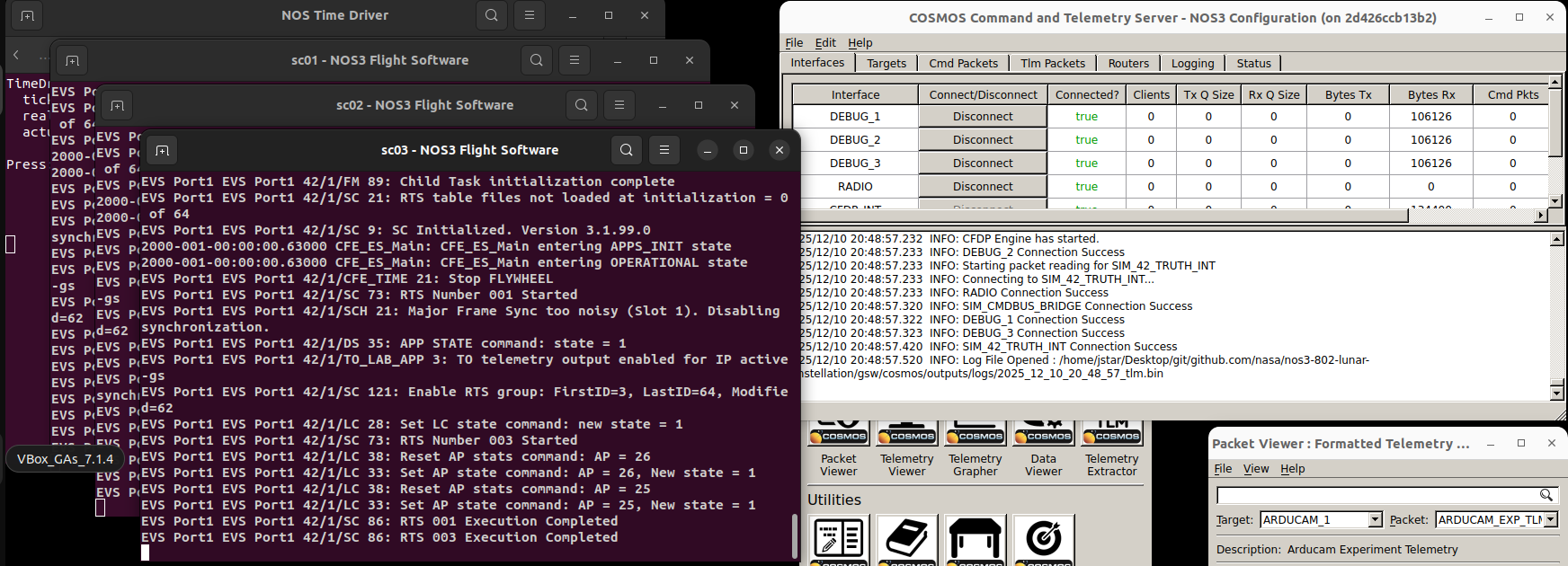
For this scenario, you will need to switch to the 802-constellation-scenario-with-lunar-focus branch. Once you do that, you can do a typical make and make launch. You will notice that three flight software windows are opened with titles sc0N - NOS3 Flight Software, where N is either 1, 2, or 3. Once you start COSMOS, you will similarly see three telemetry debug interfaces in the command and telemetry server (DEBUG_1, DEBUG_2, and DEBUG_3). This is shown in the figure below.
MultipleSpacecraft

You can verify that telemetry is being received by examining the Bytes Rx column in the COSMOS Command and Telemetry Server window.

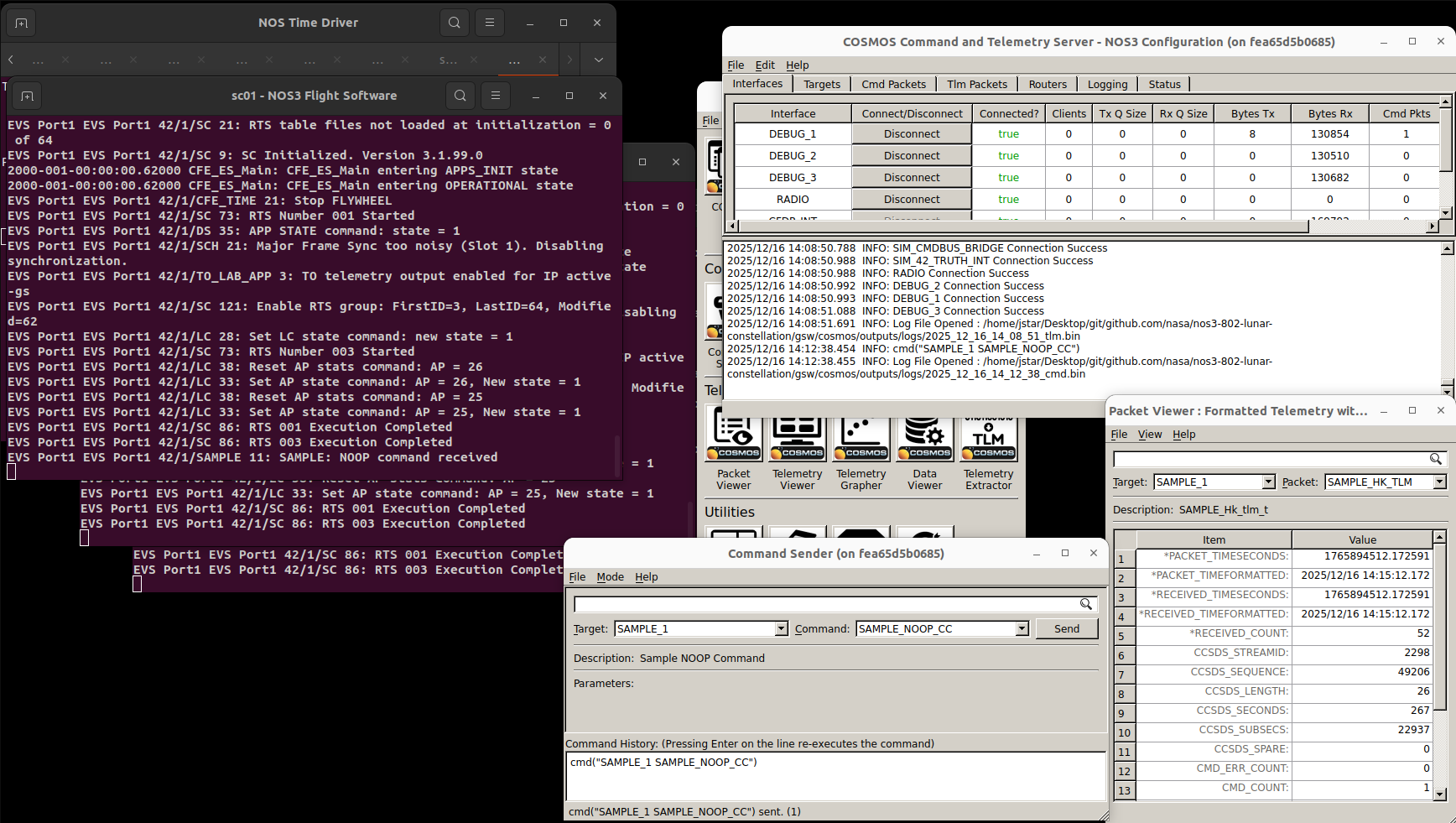
Next we will show that we can command each of the three flight software instances. In the Packet Viewer, select target SAMPLE_1 and packet SAMPLE_HK_TLM. The current command count CMD_COUNT should be 0. Now in the Command Sender window, select target SAMPLE_1 and command SAMPLE_NOOP_CC. Click Send in the Command Sender window. You should now see SAMPLE: NOOP command received in the sc01 - NOS3 Flight Software window and the CMD_COUNT increase to 1 in the Packet Viewer. This is shown below:
SendingCommand

Now verify the same command and telemetry for spacecraft 2. Send the command SAMPLE_NOOP_CC to target SAMPLE_2, and view the sc02 - NOS3 Flight Software window and the Packet Viewer, with target set to SAMPLE_2 and packet set to SAMPLE_HK_TLM. Send the command three times; verify that flight software receives it three times and that the CMD_COUNT increases to three. This is shown below:

SendingCommand2

Finally, verify the same thing for spacecraft 3 in the same way. Send the command 5 times and verify that it is received five times and that the CMD_COUNT increases to five. This is shown below:

SendingCommand3

Note that this is presently only in the branch mentioned above; however, the NOS3 team expects to incorporate support for multiple spacecraft into a future release.

Background

A number of files will need to be changed to go from a base NOS3 scenario, with a single spacecraft, to a constellation scenario with a lunar focus.

These files fall into five categories: top level configuration, 42 configuration, simulation configuration, flight software configuration, and ground software configuration.

Note all files mentioned are modified correctly in the 802-constellation-scenario-with-lunar-focus branch of NOS3. Below is a description of files need modified or added for this scenario.

Top Level Configuration

The top level configuration file that needs to be modified is cfg/nos3-mission.xml. Changes that need to be made include the following:

  • First, change the <scenario> from “STF1” to “Gateway”.

    • This will cause the scenario to use cfg/InOut/Inp_Sim_Gateway.txt instead of the cfg/InOut/Inp_Sim.txt file and cfg/InOut/Inp_Graphics_Gateway.txt instead of the cfg/InOut/Inp_Graphics.txt file for 42.

  • Next change <number-spacecraft> from “1” to “3”.

  • Finally, add Spacecraft configuration targets like <sc-1-cfg>, add <sc-2-cfg> and <sc-3-cfg> with values “spacecraft/sc-mission-config.xml”.

42 Configuration

The first change here which needs to be made is to create cfg/InOut/Inp_Sim_Gateway.txt based on cfg/InOut/Inp_Sim.txt. Duplicate cfg/InOut/Inp_Sim.txt and make the following changes:

  • Line 11 should be changed to “Orb_NRHO.txt” so that the Lunar Near Rectilinear Halo Orbit (NRHO) is used as the orbit for the spacecraft, instead of its typical Earth-centered orbit.

    • Note that the file cfg/InOut/Orb_NRHO.txt is already provided with NOS3 and specifies a Lunar NRHO orbit.

  • Line 13 should be changed from “1” to “3” and lines 14, 15, and 16 should read “SC_Gateway.txt”, “SC_Gateway2.txt”, and “SC_Gateway3.txt”.

    • Note that the files cfg/InOut/SC_Gateway.txt, cfg/InOut/SC_Gateway2.txt, and cfg/InOut/SC_Gateway3.txt are already provided with NOS3 and contain particular orbit offsets and different spacecraft models.

  • These files are also the location where parameters for spacecraft bodies or for various sensors/actuators would be changed.

Next, it is necessary to create cfg/InOut/Inp_Graphics_Gateway.txt based on cfg/InOut/Inp_Graphics.txt. Duplicate the latter file and make the following change:

  • The main thing to change here is line 16 to specify a reasonable POV range for the modified spacecraft model.

Finally, the file cfg/InOut/Inp_IPC.txt needs to be changed. It needs to have the IPC connections added for the simulators for spacecraft 2 and 3. This involves duplicating the first 15 blocks of IPC parameters for spacecraft 2 and 3, and then changing the appropriate spacecraft prefixes from “SC[0]” to “SC[1]” or “SC[2]” as appropriate. In addition, the server ports must be changed so that they are unique and correspond to the port numbers specified in the simulation configuration files sc-1-nos3-simulator.xml, sc-2-nos3-simulator.xml, and sc-3-nos3-simulator.xml.

Simulation Configuration

A .xml file is needed for each spacecraft. Accordingly, for this scenario, it is necessary to create cfg/sims/sc-1-nos3-simulator.xml, cfg/sims/sc-2-nos3-simulator.xml, and cfg/sims/sc-3-nos3-simulator.xml, all based on cfg/sims/nos3-simulator.xml:

  • cfg/sims/sc-1-nos3-simulator.xml should be an exact copy of cfg/sims/nos3-simulator.xml.

  • cfg/sims/sc-2-nos3-simulator.xml should be a copy of cfg/sims/nos3-simulator.xml except that the simulator data provider ports should be changed so that they are unique and correspond to the port numbers specified in the 42 configuration file Inp_IPC.txt.

  • cfg/sims/sc-3-nos3-simulator.xml should also be a copy of cfg/sims/nos3-simulator.xml except that the simulator data provider ports should be changed so that they are unique and correspond to the port numbers specified in the 42 configuration file Inp_IPC.txt.

Flight Software Configuration

We will need to modify the fsw_cfs_launch.sh script in order to configure each spacecraft with a running flight software docker container. Note: each container is configured the same way and is running the same cFS flight software configuration in NOS3.

Simply copy the code below and replace with your existing cfs_launch script. If you wish to go back to a single spacecraft mode, be sure to save the original fsw_cfs_launch.sh script accordingly in your environment.

#!/bin/bash -i
#
# Convenience script for NOS3 development
# Use with the Dockerfile in the deployment repository
# https://github.com/nasa-itc/deployment
#

# Note this is copied to ./cfg/build as part of `make config`
SCRIPT_DIR=$( cd -- "$( dirname -- "${BASH_SOURCE[0]}" )" &> /dev/null && pwd )
source $SCRIPT_DIR/../../scripts/env.sh

# Check that local NOS3 directory exists
if [ ! -d $USER_NOS3_DIR ]; then
    echo ""
    echo "    Need to run make prep first!"
    echo ""
    exit 1
fi

# Check that configure build directory exists
if [ ! -d $BASE_DIR/cfg/build ]; then
    echo ""
    echo "    Need to run make config first!"
    echo ""
    exit 1
fi

echo "Make data folders..."
# FSW Side
mkdir $FSW_DIR/data 2> /dev/null
mkdir $FSW_DIR/data/cam 2> /dev/null
mkdir $FSW_DIR/data/evs 2> /dev/null
mkdir $FSW_DIR/data/hk 2> /dev/null
mkdir $FSW_DIR/data/inst 2> /dev/null
touch $FSW_DIR/data/dummy.txt
echo "1234567890" > $FSW_DIR/data/dummy.txt
truncate -s 1M $FSW_DIR/data/dummy.txt
# GSW Side
mkdir /tmp/nos3 2> /dev/null
mkdir /tmp/nos3/data 2> /dev/null
mkdir /tmp/nos3/data/cam 2> /dev/null
mkdir /tmp/nos3/data/evs 2> /dev/null
mkdir /tmp/nos3/data/hk 2> /dev/null
mkdir /tmp/nos3/data/inst 2> /dev/null
mkdir /tmp/nos3/uplink 2> /dev/null
cp $BASE_DIR/fsw/build/exe/cpu1/cf/cfe_es_startup.scr /tmp/nos3/uplink/tmp0.so 2> /dev/null
cp $BASE_DIR/fsw/build/exe/cpu1/cf/sample.so /tmp/nos3/uplink/tmp1.so 2> /dev/null

echo "Create ground networks..."
$DNETWORK create \
    --driver=bridge \
    --subnet=192.168.41.0/24 \
    --gateway=192.168.41.1 \
    nos3-core
echo ""

echo "Launch GSW..."
echo ""
source $BASE_DIR/cfg/build/gsw_launch.sh

echo "Create NOS interfaces..."
export GND_CFG_FILE="-f nos3-simulator.xml"
gnome-terminal --tab --title="NOS Terminal"      -- $DFLAGS -v $SIM_DIR:$SIM_DIR --name "nos-terminal"        --network=nos3-core -w $SIM_BIN $DBOX ./nos3-single-simulator $GND_CFG_FILE stdio-terminal
gnome-terminal --tab --title="NOS UDP Terminal"  -- $DFLAGS -v $SIM_DIR:$SIM_DIR --name "nos-udp-terminal"    --network=nos3-core -w $SIM_BIN $DBOX ./nos3-single-simulator $GND_CFG_FILE udp-terminal
gnome-terminal --tab --title="NOS CmdBus Bridge"  -- $DFLAGS -v $SIM_DIR:$SIM_DIR --name "nos-sim-bridge"      --network=nos3-core -w $SIM_BIN $DBOX ./nos3-sim-cmdbus-bridge $GND_CFG_FILE

echo ""

echo "sc01 - Create spacecraft network..."
$DNETWORK create "nos3-sc01" --subnet=192.168.1.0/24
echo "sc02 - Create spacecraft network..."
$DNETWORK create "nos3-sc02" --subnet=192.168.2.0/24
echo "sc03 - Create spacecraft network..."
$DNETWORK create "nos3-sc03" --subnet=192.168.3.0/24
echo ""
echo " - 42..."
rm -rf $USER_NOS3_DIR/42/NOS3InOut
cp -r $BASE_DIR/cfg/build/InOut $USER_NOS3_DIR/42/NOS3InOut
xhost +local:*
gnome-terminal --tab --title="42" -- $DFLAGS -e DISPLAY=$DISPLAY -v $USER_NOS3_DIR:$USER_NOS3_DIR -v /tmp/.X11-unix:/tmp/.X11-unix:ro --name "fortytwo" -h fortytwo --network=nos3-core --network=nos3-sc01 --network=nos3-sc02 --network=nos3-sc03 -w $USER_NOS3_DIR/42 -t $DBOX $USER_NOS3_DIR/42/42 NOS3InOut
echo ""

# Note only currently working with a single spacecraft
export SATNUM=3

#
# Spacecraft Loop
#
for (( i=1; i<=$SATNUM; i++ ))
do
    export SC_NUM="sc0"$i
    export SC_NETNAME="nos3-"$SC_NUM
    #export SC_CFG_FILE="-f nos3-simulator.xml" #"-f sc_"$i"_nos3_simulator.xml"
    export SC_CFG_FILE="-f sc-"$i"-nos3-simulator.xml"
    # export SC_CPU=$i
    export SC_CPU=1

    # Debugging
    #echo "Spacecraft number        = " $SC_NUM
    #echo "Spacecraft network       = " $SC_NETNAME
    #echo "Spacecraft configuration = " $SC_CFG_FILE
    
#    echo $SC_NUM " - Create spacecraft network..."
#    $DNETWORK create $SC_NETNAME 2> /dev/null
#    echo ""

    echo $SC_NUM " - Connect GSW " "${GSW:-cosmos-openc3-operator-1}" " to spacecraft network..."
    $DNETWORK connect  $SC_NETNAME "${GSW:-cosmos-openc3-operator-1}" --alias cosmos --alias active-gs --ip 192.168.$i.100
    echo ""

    echo $SC_NUM " - OnAIR..."
    gnome-terminal --tab --title=$SC_NUM" - OnAIR" -- $DFLAGS -v $BASE_DIR:$BASE_DIR --name $SC_NUM"-onair" --network=$SC_NETNAME -w $FSW_DIR -t $DBOX $SCRIPT_DIR/fsw/onair_launch.sh
    echo ""

    echo $SC_NUM " - Flight Software..."
    cd $FSW_DIR
    # Debugging
    # Replace `--tab` with `--window-with-profile=KeepOpen` once you've created this gnome-terminal profile manually
    # gnome-terminal --title=$SC_NUM" - NOS3 Flight Software" -- $DFLAGS -e SC_CPU=$SC_CPU -v $BASE_DIR:$BASE_DIR -p 502$i:5013 --name $SC_NUM"-nos-fsw" -h $SC_NUM"-nos-fsw" --network=$SC_NETNAME -w $FSW_DIR --sysctl fs.mqueue.msg_max=10000 --ulimit rtprio=99 --cap-add=sys_nice $DBOX $SCRIPT_DIR/fsw/fsw_respawn.sh &
    
    gnome-terminal --title=$SC_NUM" - NOS3 Flight Software" -- $DFLAGS -e SC_CPU=$SC_CPU -v $BASE_DIR:$BASE_DIR --name $SC_NUM"-nos-fsw" -h $SC_NUM"-nos-fsw" --network=$SC_NETNAME -w $FSW_DIR --sysctl fs.mqueue.msg_max=10000 --ulimit rtprio=99 --cap-add=sys_nice $DBOX $SCRIPT_DIR/fsw/fsw_respawn.sh &
    
    # gnome-terminal --title=$SC_NUM" - NOS3 Flight Software" -- $DFLAGS -e SC_CPU=$SC_CPU -v $BASE_DIR:$BASE_DIR --name $SC_NUM"-nos-fsw" -h $SC_NUM"-nos-fsw" --network=$SC_NETNAME -w $FSW_DIR --sysctl fs.mqueue.msg_max=10000 --ulimit rtprio=99 --cap-add=sys_nice -p 502$i:5013 -p 502$i:5013/udp $DBOX $SCRIPT_DIR/fsw/fsw_respawn.sh &
    #gnome-terminal --window-with-profile=KeepOpen --title=$SC_NUM" - NOS3 Flight Software" -- $DFLAGS -v $BASE_DIR:$BASE_DIR --name $SC_NUM"-nos-fsw" -h nos-fsw --network=$SC_NETNAME -w $FSW_DIR --sysctl fs.mqueue.msg_max=10000 --ulimit rtprio=99 --cap-add=sys_nice $DBOX $FSW_DIR/core-cpu1 -R PO &
    echo ""

    echo $SC_NUM " - Simulators..."
    cd $SIM_BIN
    gnome-terminal --tab --title=$SC_NUM" - NOS Engine Server" -- $DFLAGS -v $SIM_DIR:$SIM_DIR --name $SC_NUM"-nos-engine-server"  -h nos-engine-server --network=$SC_NETNAME -w $SIM_BIN $DBOX /usr/bin/nos_engine_server_standalone -f $SIM_BIN/nos_engine_server_config.json
    gnome-terminal --tab --title=$SC_NUM" - 42 Truth Sim"      -- $DFLAGS -v $SIM_DIR:$SIM_DIR --name $SC_NUM"-truth42sim"          -h truth42sim --network=$SC_NETNAME -w $SIM_BIN $DBOX ./nos3-single-simulator $SC_CFG_FILE  truth42sim
    
    $DNETWORK connect $SC_NETNAME nos-terminal
    $DNETWORK connect $SC_NETNAME nos-udp-terminal
    $DNETWORK connect $SC_NETNAME nos-sim-bridge

    # Component simulators
    gnome-terminal --tab --title=$SC_NUM" - CAM Sim"      -- $DFLAGS -v $SIM_DIR:$SIM_DIR --name $SC_NUM"-cam-sim"      --network=$SC_NETNAME -w $SIM_BIN $DBOX ./nos3-single-simulator $SC_CFG_FILE camsim
    gnome-terminal --tab --title=$SC_NUM" - CSS Sim"      -- $DFLAGS -v $SIM_DIR:$SIM_DIR --name $SC_NUM"-css-sim"      -v /dev/shm:/dev/shm --network=$SC_NETNAME -w $SIM_BIN $DBOX ./nos3-single-simulator $SC_CFG_FILE generic-css-sim
    gnome-terminal --tab --title=$SC_NUM" - EPS Sim"      -- $DFLAGS -v $SIM_DIR:$SIM_DIR --name $SC_NUM"-eps-sim"      -v /dev/shm:/dev/shm --network=$SC_NETNAME -w $SIM_BIN $DBOX ./nos3-single-simulator $SC_CFG_FILE generic-eps-sim
    gnome-terminal --tab --title=$SC_NUM" - FSS Sim"      -- $DFLAGS -v $SIM_DIR:$SIM_DIR --name $SC_NUM"-fss-sim"      -v /dev/shm:/dev/shm --network=$SC_NETNAME -w $SIM_BIN $DBOX ./nos3-single-simulator $SC_CFG_FILE generic-fss-sim
    gnome-terminal --tab --title=$SC_NUM" - GPS Sim"      -- $DFLAGS -v $SIM_DIR:$SIM_DIR --name $SC_NUM"-gps-sim"      -v /dev/shm:/dev/shm --network=$SC_NETNAME -w $SIM_BIN $DBOX ./nos3-single-simulator $SC_CFG_FILE gps
    gnome-terminal --tab --title=$SC_NUM" - IMU Sim"      -- $DFLAGS -v $SIM_DIR:$SIM_DIR --name $SC_NUM"-imu-sim"      -v /dev/shm:/dev/shm --network=$SC_NETNAME -w $SIM_BIN $DBOX ./nos3-single-simulator $SC_CFG_FILE generic-imu-sim
    gnome-terminal --tab --title=$SC_NUM" - MAG Sim"      -- $DFLAGS -v $SIM_DIR:$SIM_DIR --name $SC_NUM"-mag-sim"      -v /dev/shm:/dev/shm --network=$SC_NETNAME -w $SIM_BIN $DBOX ./nos3-single-simulator $SC_CFG_FILE generic-mag-sim
    gnome-terminal --tab --title=$SC_NUM" - RW 0 Sim"     -- $DFLAGS -v $SIM_DIR:$SIM_DIR --name $SC_NUM"-rw-sim0"      -v /dev/shm:/dev/shm --network=$SC_NETNAME -w $SIM_BIN $DBOX ./nos3-single-simulator $SC_CFG_FILE generic-reactionwheel-sim0
    gnome-terminal --tab --title=$SC_NUM" - RW 1 Sim"     -- $DFLAGS -v $SIM_DIR:$SIM_DIR --name $SC_NUM"-rw-sim1"      -v /dev/shm:/dev/shm --network=$SC_NETNAME -w $SIM_BIN $DBOX ./nos3-single-simulator $SC_CFG_FILE generic-reactionwheel-sim1
    gnome-terminal --tab --title=$SC_NUM" - RW 2 Sim"     -- $DFLAGS -v $SIM_DIR:$SIM_DIR --name $SC_NUM"-rw-sim2"      -v /dev/shm:/dev/shm --network=$SC_NETNAME -w $SIM_BIN $DBOX ./nos3-single-simulator $SC_CFG_FILE generic-reactionwheel-sim2
    gnome-terminal --tab --title=$SC_NUM" - Radio Sim"    -- $DFLAGS -v $SIM_DIR:$SIM_DIR --name $SC_NUM"-radio-sim"    -h radio-sim --network=$SC_NETNAME --network-alias=radio-sim -w $SIM_BIN $DBOX ./nos3-single-simulator $SC_CFG_FILE generic-radio-sim
    gnome-terminal --tab --title=$SC_NUM" - Sample Sim"   -- $DFLAGS -v $SIM_DIR:$SIM_DIR --name $SC_NUM"-sample-sim"   -v /dev/shm:/dev/shm --network=$SC_NETNAME -w $SIM_BIN $DBOX ./nos3-single-simulator $SC_CFG_FILE sample-sim
    gnome-terminal --tab --title=$SC_NUM" - StarTrk Sim"  -- $DFLAGS -v $SIM_DIR:$SIM_DIR --name $SC_NUM"-startrk-sim"  -v /dev/shm:/dev/shm --network=$SC_NETNAME -w $SIM_BIN $DBOX ./nos3-single-simulator $SC_CFG_FILE generic-star-tracker-sim
    gnome-terminal --tab --title=$SC_NUM" - Thruster Sim" -- $DFLAGS -v $SIM_DIR:$SIM_DIR --name $SC_NUM"-thruster-sim" --network=$SC_NETNAME -w $SIM_BIN $DBOX ./nos3-single-simulator $SC_CFG_FILE generic-thruster-sim
    gnome-terminal --tab --title=$SC_NUM" - Torquer Sim"  -- $DFLAGS -v $SIM_DIR:$SIM_DIR --name $SC_NUM"-torquer-sim"  -h trq-sim --network=$SC_NETNAME -w $SIM_BIN $DBOX ./nos3-single-simulator $SC_CFG_FILE generic-torquer-sim
    
    # gnome-terminal --tab --title=$SC_NUM" - Blackboard Sim"  -- $DFLAGS -v $SIM_DIR:$SIM_DIR --name $SC_NUM"-blackboard-sim" -v /dev/shm:/dev/shm -h blackboard-sim --network=$SC_NETNAME -w $SIM_BIN $DBOX ./nos3-single-simulator $SC_CFG_FILE blackboard-sim
    # cp cfg/InOut/Inp_IPC.shmem.txt cfg/InOut/Inp_IPC.txt
    # cp cfg/sims/nos3-simulator.shmem.xml cfg/sims/nos3-simulator.xml

    echo ""

    echo $SC_NUM " - CryptoLib..."
    gnome-terminal --tab --title=$SC_NUM" - CryptoLib GSW" -- $DFLAGS -v $BASE_DIR:$BASE_DIR --name $SC_NUM"_cryptolib_gsw"  --network=$SC_NETNAME --network-alias=cryptolib -w $BASE_DIR/gsw/build $DBOX ./support/standalone
    echo ""
done

echo "NOS Time Driver..."
sleep 8
gnome-terminal --tab --title="NOS Time Driver"   -- $DFLAGS -v $SIM_DIR:$SIM_DIR --name nos-time-driver --network=nos3-core -w $SIM_BIN $DBOX ./nos3-single-simulator $GND_CFG_FILE time
sleep 1
for (( i=1; i<=$SATNUM; i++ ))
do
    export SC_NUM="sc0"$i
    export SC_NETNAME="nos3-"$SC_NUM
    export TIMENAME=$SC_NUM"-nos-time-driver"
    $DNETWORK connect --alias nos-time-driver $SC_NETNAME nos-time-driver
done
echo ""

echo "Docker launch script completed!"


Ground Software Configuration

Next, it is necessary to modify Cosmos in order to include the necessary targets for each spacecraft.

First, you will need to modify the system.txt file located nos3/gsw/cosmos/config/system/stash. Add the necessary targets by duplicating the targets already in that file. Simply duplicate the Component Targets 3 times, renaming each target for each spacecraft. For example:

cmd_tlm_server_ref

Once all the targets are duplicated for the 3 Spacecraft, we will add them to the cmd_tlm_server for cosmos.

Next we modify the cmd_tlm_server.txt located in the file path /nos3/gsw/cosmos/config/tools/cmd_tlm_server/stash. You will need to duplicate the existing target definitions 3 times for the debug interface 1, 2, and 3 respectively. Note you will need to assign the appropriate host name of the appropriate spacecraft flight software container to each interface, and bind it to the correct IP address as defined in the CFS Launch script we modified earlier. We do this so Cosmos can command flight software and process telemetry coming from port 5013 from 3 different containers at the same time.

cmd_tlm_server_ref