Components
NOS3 is organized around the foundational concept of a component.
The intent is that a spacecraft be made up of a core set of common functionality and then a custom set of components.
Each component is represented by a FSW application which is placed in an fsw subdirectory of the component.
In order for the ground software to control the component application, a component has a collection of command and telemetry tables which are placed in a gsw subdirectory of the component.
In many cases (but not all), a component is a hardware component on the spacecraft and thus it is appropriate to have a NOS3 hardware simulator for the component which is placed in a sims subdirectory of the component.
Generic Components
NOS3 provides a baseline set of generic components in order to provide an example reference mission on which to build and develop additional tools and technologies.
Component Information
High level reference information has been compiled for the various components. Note that it is assumed telemetry messages are also within range, but just follow the form 0x0XXX opposed to 0x1XXX for command MIDs.
Camera - Arducam
Protocol(s): I2C and SPI
MSGID range: 0x18C8 - 0x18CA
Perf_IDs: 105, 106
Fprime Base ID: 0xF900
Coarse Sun Sensors (CSS)
Protocol(s): I2C
MSGID range: 0x1910 - 0x1911
Perf_IDs: 600, 601
Fprime Base ID: 0xE300
Electrical Power System (EPS)
Protocol(s): I2C
MSGID range: 0x191A - 0x191B
Perf_IDs: 401
Fprime Base ID: 0xE200
Fine Sun Sensors (FSS)
Protocol(s): SPI
MSGID range: 0x1920 - 0x1921
Perf_IDs: 510, 511
Fprime Base ID: 0xE400
Global Positioning System (GPS) - Novatel OEM615
Protocol(s): streaming UART
MSGID range: 0x1870 - 0x1871
Perf_IDs: 48
Fprime Base ID: 0xE800
Inertial Measurement Unit (IMU)
Protocol(s): CAN
MSGID range: 0x1925 - 0x1926
Perf_IDs: 530, 531
Fprime Base ID: 0xE600
Magnetometer
Protocol(s): SPI
MSGID range: 0x192A - 0x192B
Perf_IDs: 540, 541
Fprime Base ID: 0xEF00
Radio
Protocol(s): Sockets
MSGID range: 0x1930 - 0x1931
Perf_IDs: 520
Fprime Base ID: 0xE100
Reaction Wheel
Protocol(s): UART
MSGID range: 0x1992 - 0x1993
Perf_IDs: 77
Fprime Base ID: 0xE700
Sample
Protocol(s): UART
MSGID range: 0x18FA - 0x18FB
Perf_IDs: 500
Fprime Base ID: 0x0F00
Star Tracker
Protocol(s): UART
MSGID range: 0x1935 - 0x1936
Perf_IDs: 550
Fprime Base ID: 0xE000
Torquers
Protocol(s): PWM via HWLIB’s TRQ commands
MSGID range: 0x193A - 0x193B
Perf_IDs: 505
Fprime Base ID: 0xE900
Thrusters
Protocol(s): UART
MSGID range: 0x18EA - 0x18EB
Perf IDs: 508
Fprime Base ID: 0xE500
Component Development
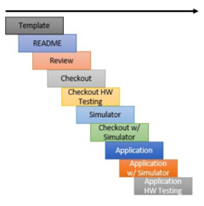
Template Generation
The development of a new component starts with using the template generator provided by NOS3. This template establishes a standard format and structure for the component, ensuring consistency and combability with the rest of the framework.
Component Documentation Review
Review and update the documentation for the component to provide comprehensive information about the software interface between the hardware component and flight software. The component readme should include details on the document and versions utilized during development and a comprehensive test plan. It is recommended to have another developer or team member to review the documentation and ensure its completeness and accuracy.
Standalone Checkout Application Development
Develop a standalone checkout application that serves as a test environment for the component. This application can be built to run in the NOS3 simulation or on a development board.
Hardware and Flight Software Integration
In cases where hardware availability is delayed, the development of the flight software application can procced using the same functions and hardware library calls used in the standalone checkout application. This approach ensures that the flight software application primarily serves as an integration test with the rest of the software components, including the ground software and associated integration tests documented in the test plan. Note that the simulation is not a replacement for traditional hardware testing, but an additional tool to be used to reduce schedule and risk.
Component Updates and Refinements
Once hardware testing becomes possible, additional time should be allocated to update the component based on insights and findings from the hardware testing phase. This includes making necessary adjustments within the NOS3 framework to ensure proper functionality and performance.
Generic Components
These components provide a standardized starting point for building simulations and training materials. By including generic components, NOS3 can showcase standard commands, telemetry, and interfaces to potential users who are not familiar with the underlying software modules.
The generic components in NOS3 ensure that the framework remains adaptable, flexible, and relevant to a wide range of space missions. It empowers developers and mission teams to leverage existing components as building blocks and focus their efforts on specific mission requirements and optimizations, rather than starting from scratch.
Integrated Algorithms
Attitude Determination and Control System (ADCS)
Protocol(s): N/A
MSGID range: 0x1940 - 0x194F
Perf_IDs: 777
CryptoLib
Protocol(s): N/A
MSGID range: 0x1915 - 0x1916
CryptoLib provides a software-only solution using the CCSDS Space Data Link Security Protocol - Extended Procedures (SDLS-EP) to secure communications between a spacecraft’s flight software and a ground station. CryptoLib was originally designed as a Core Flight System (cFS) spacecraft library but has recently expanded in scope to become more generic and support telecommand encryption using gcrypt.
To get started with CryptoLib, you can visit the GitHub repository maintained by NASA. The documentation provides detailed information on usage, configuration, and testing.
OnAir
OnAir is a free and open source framework developed by Dr. Evana Gizzi, Dr. James Marshall, and a team at the NASA Goddard Space Flight Center (GSFC) that allows the running of an AI model utilizing flight data. This can be done offline with CSV and other formats, but it’s ability to use the Software Bus Network (SBN) cFS app, and its C/Python bridge client (SBN_Client) are utilized to integrate it into NOS3, so a user can configure packets to feed from the cFS Software Bus into OnAIR running a Python-based AI model in real time. Currently, the system is configured to only read a basic Sample App packet as a proof of concept; however, with some reconfiguration, a user may feed any packets into a custom model with the system
In order to configure OnAIR to utilize a specific packet or parameter, it must be defined within OnAIR, and then subscribed to with SBN.
To define a packet in SBN, go to nos3\components\onair\message_headers.py and replicate the structs for your desired packets in a method similar to that displayed.
Then, go to nos3\components\onair\cfs_sample_tlm.json and enter the headers there, along with the proper Message ID and packet info at the bottom.
The information you need for this should be found in each particular app or component’s msgids.h, msg.h, app.h and/or device.h.
This should be all the configuration necessary, as the Message ID provided in the cfs_sample_tlm.json (or equivalent) file should be passed to SBN and SBN_Client, which should both auto-subscribe to the packet internally.
This can be verified by checking for a matching data stream in your OnAIR window.
In order to utilize these packets properly, you’d need to build a plugin in OnAIR, which would utilize the structs you created to pass on the telemetry values you are collecting for you to use. You’d then set up your AI model, choose what telemetry you wish to be parameters, set it up, and run it. However, the details are beyond the scope of this guide, and could likely be found either in OnAIR’s documentation, or that for whatever AI Library you choose to use (TensorFlow, Keras, Scikit, PyTorch, etc).
Synopsis
Protocol(s):
MSGID range: 0x18FC - 0x18FD
Perf_IDs: 560