Scenario - Simulator Expansion
This scenario was developed to explain how to expand a simulator. In this scenario, we will expand the Sample simulator to use additional data from 42. This scenario will show how data flows through the entire system: The data starts at 42, passes to the simulator, which talks to the component application, and then that component application publishes COSMOS telemetry.
This scenario was last updated on 06/06/2025 and leveraged the dev branch at the time [53d4627].
Learning Goals
By the end of this scenario, you should be able to:
Turn on 42 output in the 42 window.
Enhance the Sample simulator to retrieve additional data from 42.
Enhance the Sample simulator to provide additional data to flight software.
Enhance the Sample flight software to receive additional data from the simulator and to provide additional telemetry for the additional data.
Enhance the Sample telemetry definition to view additional telemetry for the additional data.
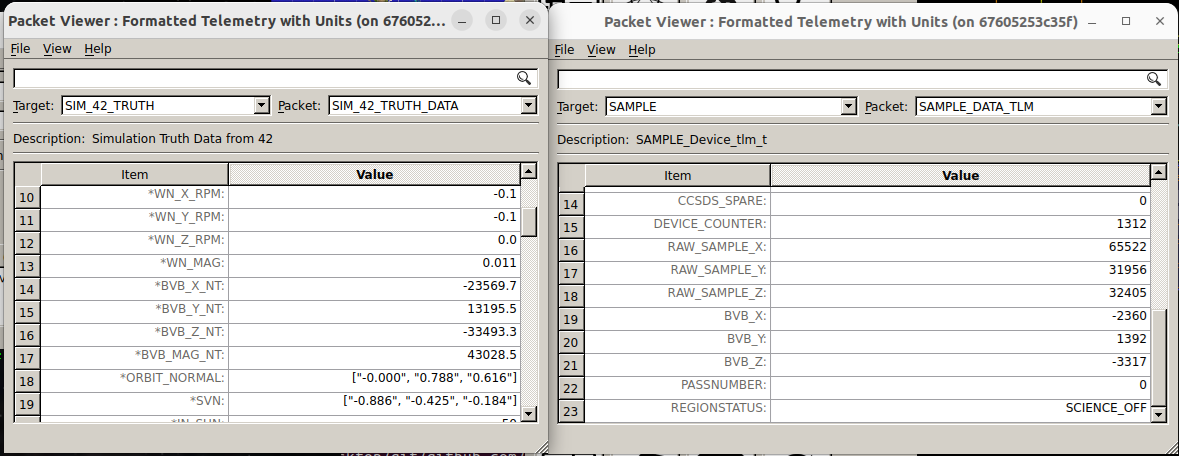
Run NOS3 and view the additional data in the Sample telemetry.
Prerequisites
Before running the scenario, complete the following steps:
No additional file changes or special setup is needed for this scenario.
Walkthrough
Before we start using additional 42 data, it would be useful to see what data 42 provides. We will do this by turning on 42 output in the 42 terminal window, so that when NOS3 is running we can see all the data coming in from 42.
Turn on 42 output in the 42 window
First, we will turn on the 42 data provider:
Edit
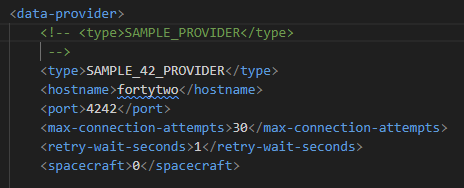
cfg/sims/nos3-simulator.xml.Locate the “sample_sim” simulator section.
Comment out the “SAMPLE_PROVIDER” section and uncomment the “SAMPLE_42_PROVIDER” section:
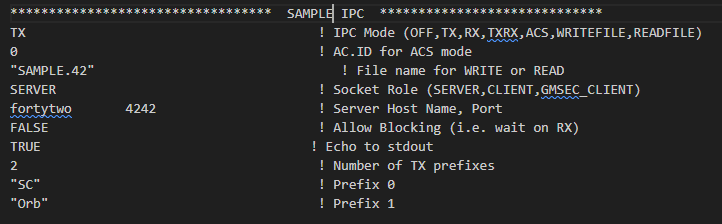
Next, we have to ensure that the 42 data knows where it is going (and is going to the correct place):
Edit
cfg/InOut/Inp_IPC.txt.Add an 11 line section to the end that is like the previous section.
Change the filename to “SAMPLE.42”.
Change the host port to
4242and echo to stdout toTRUE.
Now, to test:
Change line 2 to be one more than the current value.
Run
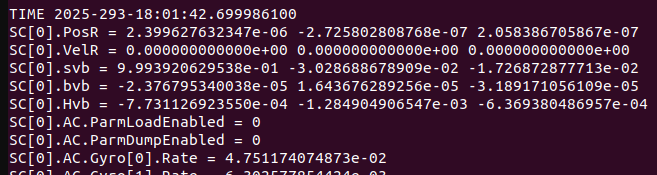
make, thenmake launchThe 42 terminal window should now show 42 output:
Run make stop to clean up.
Enhance the Sample simulator to retrieve additional data from 42
Now that we can see the data, we have decided that getting the magnetic field vector (bvb) information would be useful:
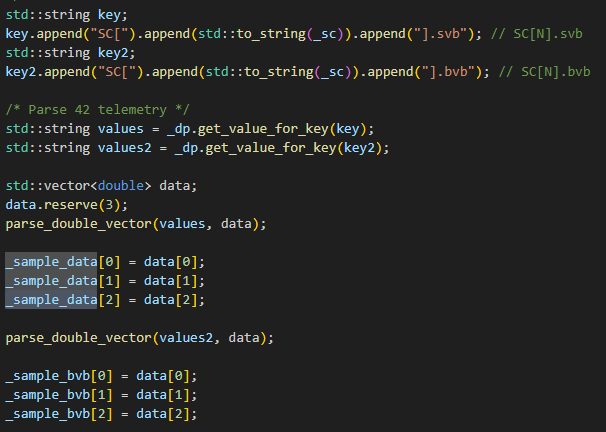
Edit the
components/sample/sim/src/sample_data_point.cppfile.Add another key to extract the “SC[0].bvb” data.
Add line to get value for key.
Add parsing and saving of the “bvb” data.
Add “_sample_bvb” array to the “SampleDataPoint” and add getter methods (
sample_data_point.hpp). This file can be foundcomponents/sample/sim/inc.
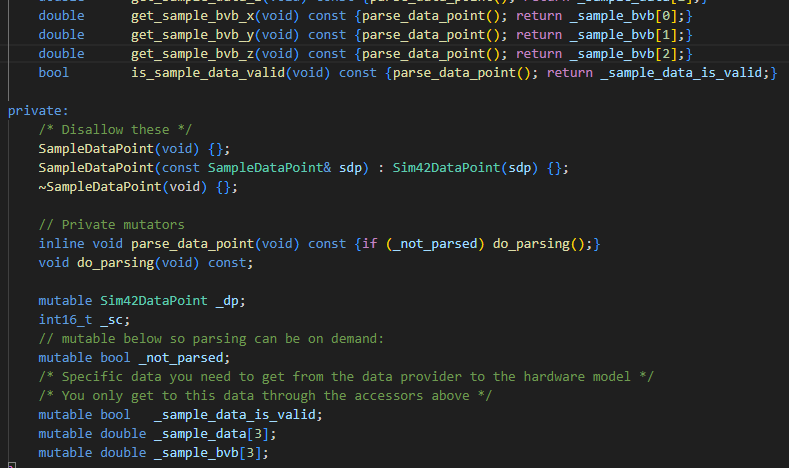
Expand the Sample Simulator
The sample simulator is now receiving the additional data we selected, but it is not currently being used or sent anywhere. We can change that, passing the data back to the FSW:
Edit the
components/sample/sim/src/sample_hardware_model.cppfile.Add “bvb” data to the out_data in the “create_sample_data()” method. Note be sure to change the size of the out_data (out_data.resize(14, 0x00)) to 20, increasing the original value from 14. This is defined at top of the method.
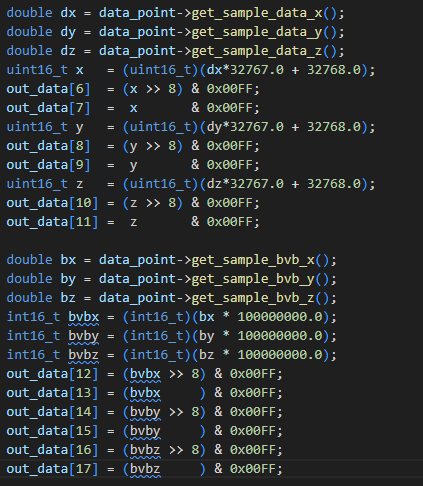
Now, to test, we will launch everything:
Run
make clean, thenmake, andmake launch.The 42 window should now show 42 output and the sample sim window should show a connection to get the 42 data.
Run
make stop.
Enhance the Sample Flight Software
Next, we will expand the capabilities of the sample_device:
Edit the
components/sample/fsw/shared/sample_device.cfile.Add “bvb” data reads in the “SAMPLE_RequestData()” function. Note, since we have increased our data buffer, we are changing the conditional to check read_data indices 18 and 19 in order to find the appropriate trailer message.
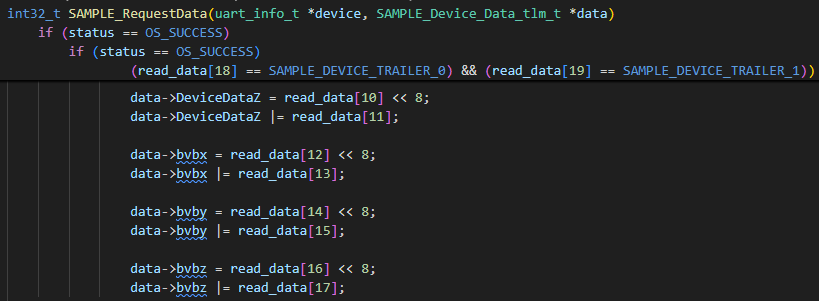
Edit the
components/sample/fsw/shared/sample_device.hfile.Add “bvb” members to the “SAMPLE_Device_Data_tlm_t” structure.
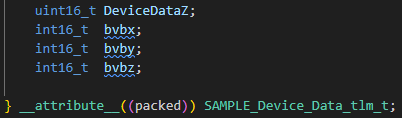
Enhance the Sample Telemetry Definition
Lastly, we will expand the Sample telemetry definition to include the bvb data:
Edit the
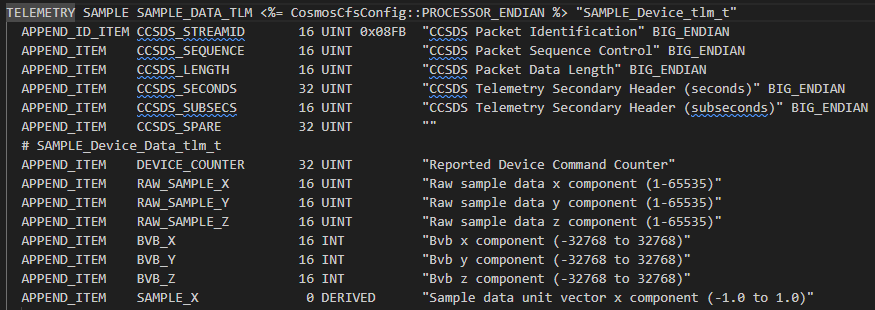
components/sample/gsw/SAMPLE/cmd_tlm/SAMPLE_TLM.txttelemetry definition file.Add “bvb” telemetry points to the “SAMPLE_DATA_TLM” telemetry packet.
Run NOS3 and view the additional data in the Sample telemetry
Once the simulator expansion has been accomplished as above, we can test it by running NOS3. It should look something like the following:
Conclusion
In this scenario, we have added additional 42 data to the Sample app. The process is largely similar for expanding or enhancing any of the simulators, even an entirely original one.